
Shortlist
The Shortlist tab is a ranked, cross-type view of the most interesting variants in a case. It combines SNV/indel, SV, CNV, and STR candidates into a single list ordered by a weighted clinical-relevance score, so you can triage the best candidates without jumping between per-type tabs.
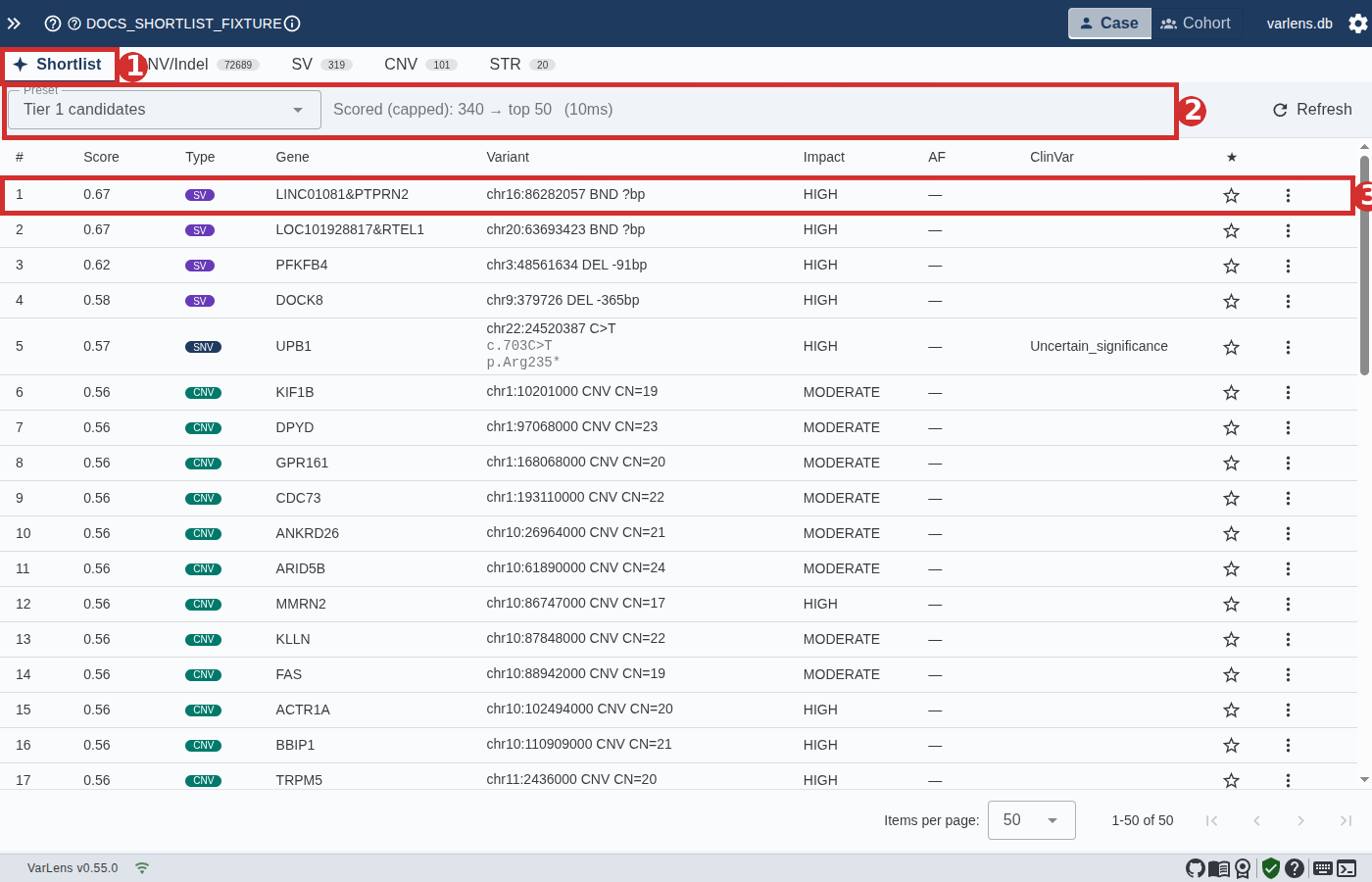
- Shortlist tab — a warm-primary accent bar marks it as categorically different from the raw per-type tabs that follow (SNV/Indel, SV, CNV, STR). Shown for every case that contains at least one variant type.
- Panel header — preset picker on the left, status line in the middle (
Scored (capped): N → top M (elapsed ms)), and a Refresh button on the right. - Ranked row — rank number, weighted Score (hover for a per-component breakdown), variant type chip, gene, coordinate + HGVS c./p. (SNV/indel), impact, allele frequency, ClinVar, star toggle, and a row-level actions menu.
What it is for
The Shortlist exists for two complementary reasons:
- Cross-type comparison in a single view. A loss-of-function SNV, a large deletion, and a pathologic STR expansion can now compete for attention under one ordering, which matches how clinicians actually triage multi-assay cases.
- Algorithmic ranking of best variants. Even when a case has only one variant type (e.g. SNV-only research exomes), the ranked view saves you from manually configuring filters and sorts to surface top candidates.
Built-in presets
Three presets ship with every database and drive different triage strategies. Switch between them from the preset picker in the panel header.
| Preset | Scope | Strategy |
|---|---|---|
| Tier 1 candidates | All 5 variant types | Strict: rare HIGH/MODERATE impact, top 50. ClinVar P/LP and starred variants are pinned to the top regardless of their raw score. |
| All rare damaging | All 5 variant types | Broad: any rare HIGH/MODERATE variant, top 200. Score-driven ordering with no pins. |
| Recessive candidates | SNV/indel only | Narrower: rare HIGH/MOD SNVs with impact + pathogenicity + rarity + ClinVar weighting. Good starting point for recessive disease cases. |
Each preset defines:
- A filter set applied to all variant types before ranking.
- A per-type override that loosens filters where needed (e.g. SV/CNV get a 1% allele-frequency ceiling instead of the 0.1% used for SNVs because no gnomAD-SV source is wired).
- A weight vector for the five score components (impact, pathogenicity, rarity, ClinVar, phenotype).
- Optional pin rules (
clinvarPinTop,pinStarredTop) and tie-breakers applied after the primary rank sort.
The full heuristic, every numeric threshold, and every rationale is documented in the Shortlist scoring heuristic reference (developer doc — useful if you want to understand exactly how a score is computed).
How rows are ordered
After Stage 1 fetches candidate rows from the database and Stage 2 computes a weighted score per row, the final sort applies a 5-level partition:
- Starred-pinned first — when
pinStarredTopis on and you've starred the row. - ClinVar-pinned next — when
clinvarPinTopis on and the row's ClinVar significance is ≥ Likely pathogenic. rank_scoreDESC — the primary weighted sort.- Caller-supplied tie-breakers — up to 10 sort directives (e.g. CADD DESC, then gene name ASC).
idASC — stable deterministic fallback.
Starred variants override ClinVar-pinned ones, so a star is the strongest curation signal you can apply.
Score breakdown on hover
Hover any row's Score badge to see the weighted breakdown: the five components (impact, pathogenicity, rarity, ClinVar, phenotype) with their raw sub-scores in [0, 1], alongside any active pin flag (Starred or ClinVar P/LP). This makes the ranking transparent — you can always see why a row is near the top.
Auto-refresh on annotation
When you star, comment on, or ACMG-classify any variant in the current case (from any tab — SNV, SV, CNV, STR, or Shortlist itself), the Shortlist automatically re-fetches within one IPC round-trip. You never need to click Refresh manually. This is driven by an internal variants:annotationChanged broadcast the main process emits on every successful annotation write.
Row actions
Each row supports:
- Click the row → opens Variant Details in the side panel, same as the per-type tables. Structural-variant, CNV, and STR rows all route through the same drill-down path thanks to a shared row contract.
- Star icon → toggles the star. Writes through
annotations:upsertPerCase; the broadcast refresh handles the rest. - ⋮ (kebab) menu → View details (same as row click) and View in <type> tab — the latter switches to the corresponding per-type tab where you keep the full per-type VariantTable context.
Pagination and scrolling
The Shortlist table paginates at 50 rows per page by default. You can switch to 25, 50, 100, 250, or 500 via the per-page selector at the bottom. For large result sets the table body scrolls independently of the footer so pagination controls are always in view.
Choosing your default active tab
Which tab opens first when you navigate into a case is a per-user preference. The default is Shortlist, but if you prefer to start from the raw per-type table you can flip it:
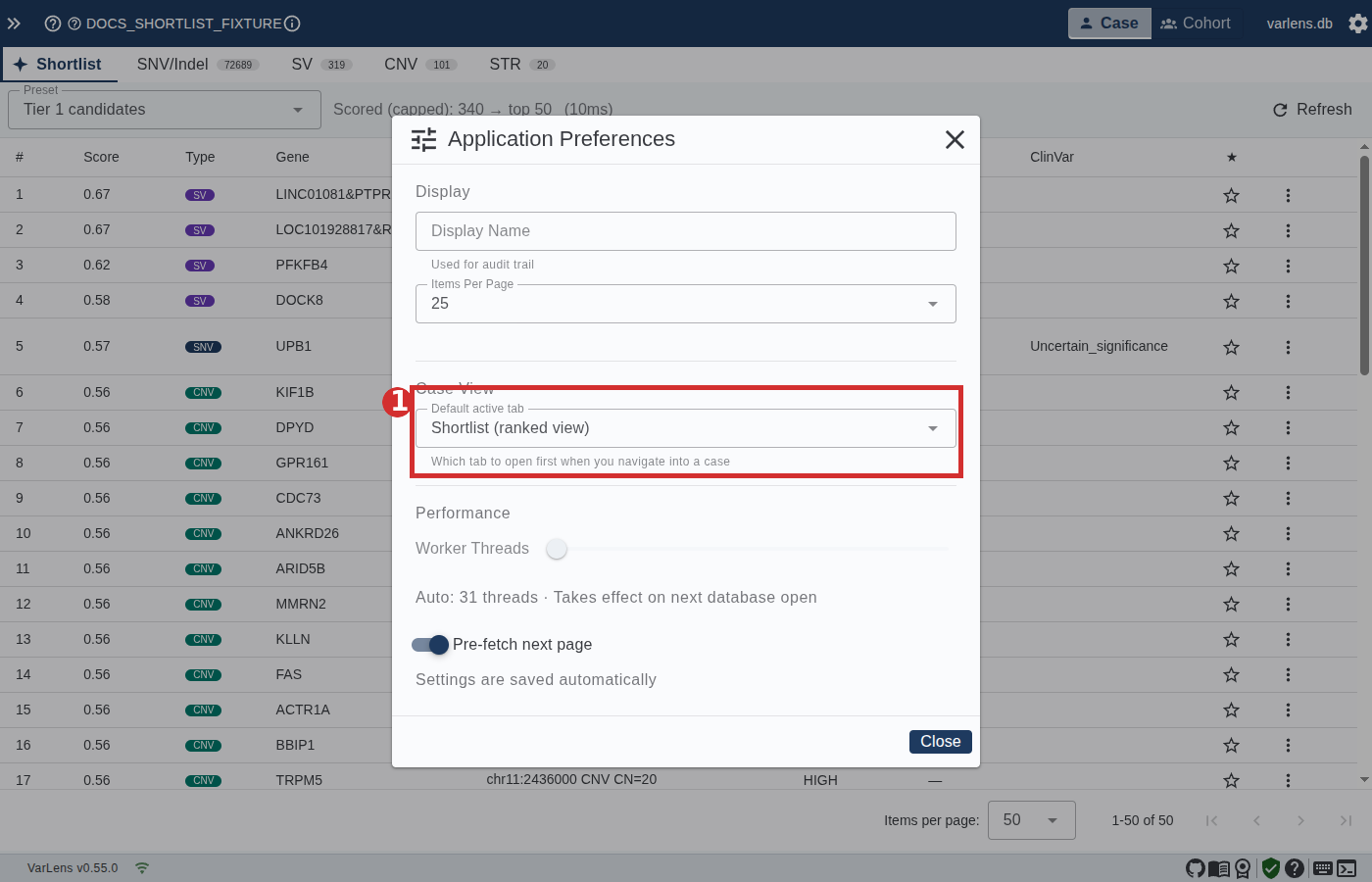
- Default active tab dropdown under Case View in the preferences dialog. Choose:
Shortlist (ranked view)— default; land on the ranked view every time.SNV/Indel (per-type table)— land on the first present per-type tab (SNV/indel, or whichever type the case has).
Where to find the setting
- Click the gear icon ⚙ in the top-right corner of the VarLens app bar.
- Select Application Preferences.
- Scroll to the Case View section.
- Change Default active tab to your preference.
- The change is saved automatically and takes effect the next time you open any case.
The Shortlist tab itself is always shown when a case has at least one variant type — this preference only controls which tab is default-active, not whether the tab exists. Switching to Shortlist from a per-type tab is still a single click away.
When the Shortlist tab does NOT appear
Only one case in the whole UI where the tab is hidden: an empty case with zero variants of any type. Every case with at least one SNV, indel, SV, CNV, or STR gets a Shortlist tab.
Known limitations
These are documented as Phase-1 gaps and tracked for future releases:
- No population frequency for SVs, CNVs, or STRs. There's no gnomAD-SV equivalent wired into VarLens yet, so the rarity component for those types is a placeholder
1.0(full credit). SNV rarity via gnomAD works as expected. - Inheritance-mode filtering is not forwarded to the Shortlist Stage-1 query. The "Recessive candidates" preset uses HIGH/MOD consequence + rarity filters to approximate the intent. A future release will forward
inheritanceModesonce the shared filter builder supports it on the Shortlist path. - Phenotype similarity is disabled by default. All three built-in presets set the
phenotypeweight to 0 because VarLens doesn't ship with an HPO similarity pipeline. The formula slot is ready for phenotype scoring — only a preset weight change is needed once the source lands.
Related
- Variant Table — the raw per-type tables underneath each tab.
- Filtering — the shared filter engine that drives the Shortlist's Stage-1 query.
- Filter Presets — the non-Shortlist preset system (classic
kind='filter'presets). - Variant Details — the side panel opened by row clicks.
- Annotations — the star / comment / ACMG write-through that drives auto-refresh.